




CI (Continuous Integration) configuration for ROS (Robot Operating System). This is the refactored version with ROS2 support, the old version can be found in the legacy branch. Please check the migration guide as well.
Table of Contents
Other than the brief introduction in this page, you can also check the detailed doc here.
This package contains CI (Continuous Integration) scripts that any ROS-powered packages can commonly use. Some notable feature:
- Checks if your package builds, installs without issues. If unit/system tests are defined run them. ROS Prerelease Test can optionally be run.
- Proven to cover the general requirements of the ROS-based robotics repositories. Easily configurable.
- Users can add custom pre/post processes.
- Covers ROS1 Indigo, Jade, Kinetic, Lunar, Melodic, Noetic and ROS2 distributions.
- This repo provides scripts for Bitbucket CI, Gitlab CI, GitHub Actions and Travis CI only, but it can be easily adapted for other CI services.
For a brief overall introduction, you could also check a presentation:
With a few steps, you can start in your client repository using CI confiurations stored in industrial_ci.
- Activate CI for your github repository on Travis CI).
- You may do so either at https://travis-ci.com/github/YOUR_GITHUB_ORGANIZATION or at https://travis-ci.com/github/YOUR_GITHUB_USER (depending on where your repository sits).
- Activate CI beta for your bitbucket repository is similar, but the target link that your status badge directs to needs to be modified from https://travis-ci.com/USERNAME/REPO_NAME to https://travis-ci.com/bitbucket/USERNAME/REPO_NAME. By default, the generated link directs to a github repository.
- Add .travis.yml file to your repository root (complete template):
language: generic
services:
  - docker

env:
  matrix:
    - ROS_DISTRO="indigo"

install:
  - git clone --quiet --depth 1 https://github.com/ros-industrial/industrial_ci.git .industrial_ci -b master
script:
  - .industrial_ci/travis.sh
- Note: The name .industrial_ci is NO longer REQUIRED for the cloned folder starting version 0.3.2; you can pick any name (recommended practice to keep the folder hidden (by prepending ".").
- Enable CI for your repo. Please refer to official doc for the steps to do so. Note for Gitlab CI, necessary steps might be different between hosted version (i.e. the one on gitlab.com) v.s. the one on your own server, which Gitlab doesn't always clarify in its documentation.
- In .gitlab-ci.yml file in your client repo, add the following minimal configuration (this snippet can be the entire content of the file), replacing indigo for your chosen distro:
image: docker:git
services:
  - docker:dind
before_script:
  - apk add --update bash coreutils tar
  - git clone --quiet --depth 1 https://github.com/ros-industrial/industrial_ci .industrial_ci -b master
indigo:
  script: .industrial_ci/gitlab.sh ROS_DISTRO=indigo
- Enable CI for your repo. Please refer to official doc for the steps to do so.
- In the bitbucket-pipelines.yml file in your client repo, add the following minimal configuration (this snippet can be the entire content of the file), replacing indigo for your chosen distro:
image: docker:git

pipelines:
  default:
     - step:
         services:
           - docker
         script:
           - apk add --update bash coreutils tar
           - git clone --quiet --depth 1 https://github.com/ros-industrial/industrial_ci .industrial_ci -b master
           - .industrial_ci/bitbucket.sh ROS_DISTRO=indigo

definitions:
  services:
    docker:
      memory: 2048
- Create .github/workflows/industrial_ci_action.yml (industrial_ci_action.yml is arbitrary, complete template) with the following configuration, (this snippet can be the entire content of the file), replacing melodic for your chosen distro:
name: CI

on: [push, pull_request]

jobs:
  industrial_ci:
    strategy:
      matrix:
        env:
          - {ROS_DISTRO: melodic, ROS_REPO: testing}
          - {ROS_DISTRO: melodic, ROS_REPO: main}
    runs-on: ubuntu-latest
    steps:
      - uses: actions/checkout@v4
      - uses: 'ros-industrial/industrial_ci@master'
        env: ${{matrix.env}}
- Connect your source code repository to your Google Cloud Project. Please refer to the official documentation for the steps to do so.
- In the cloudbuild.yaml file in your client repo, add the following minimal configuration
steps:
  - name: 'ros:melodic'
    entrypoint: 'bash'
    args:
      - '-c'
      - |-
        git clone --depth 1 https://github.com/ros-industrial/industrial_ci .industrial_ci -b master
        .industrial_ci/ci.sh
    env:
      - 'ISOLATION=shell'
      - 'CI=true'
- A template for Travis CI.
- For development branch intended for ROS Indigo: ros_canopen
- For development branch intended for ROS Indigo onward:
- example 1 (Indigo and Jade compatible).
- example 2 (Indigo, Jade, Kinetic compatible. Also runs ROS Prerelease Test).
- For development branch intended for ROS Kinetic: industrial_core
- For more complexed example: .travis.yml from the same repo. You can see how options are used.
- For Gitlab CI, a small sample config.
There might not an easy way to precisely count how many repositories out there are using industrial_ci. Counting that number isn't even our priority at all, but we're often simply curious. Here's some ways that give us some clues for the usage metrics:
Searching Github repos that contain string industrial_ci) (with some duplicates. Excluding industrial_ci repo):
- 1,841 (Jan 2, 2019)
- 675 (May 15, 2018)
- 457 (Dec 12, 2017)
- 142 (Jan 20, 2017)
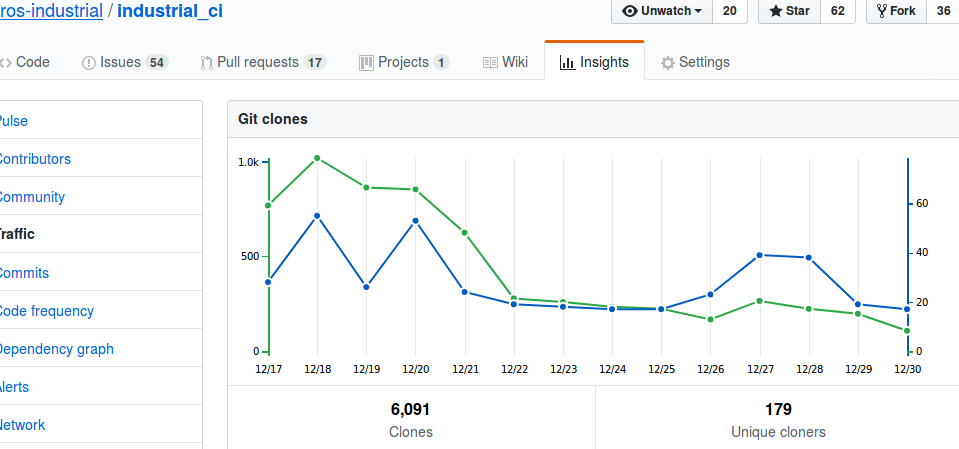
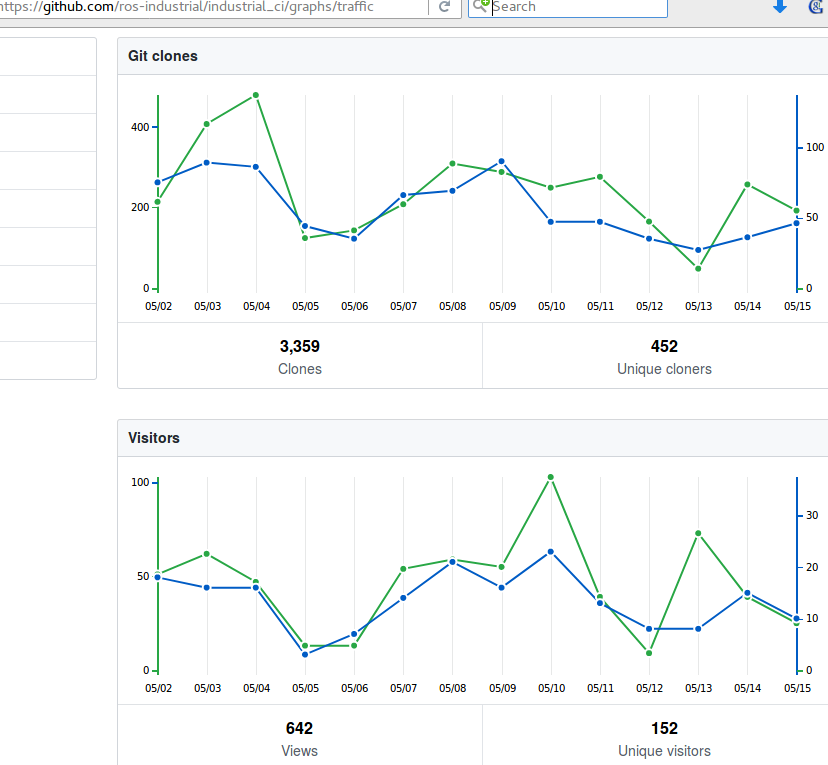
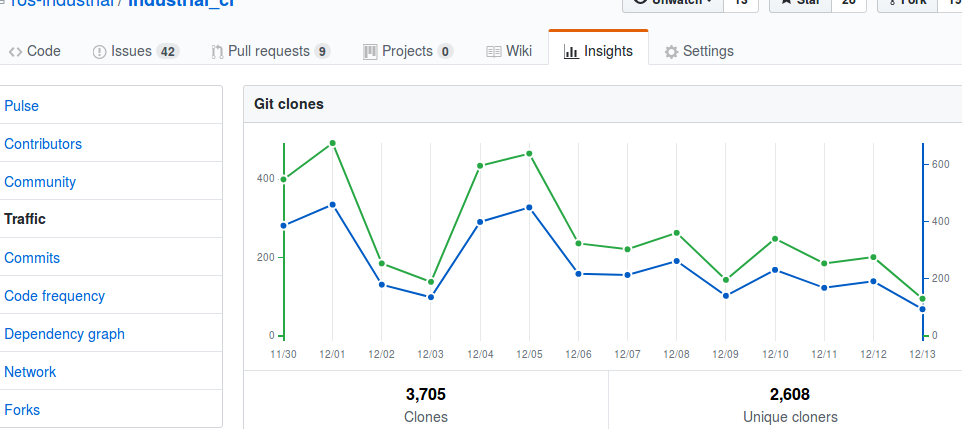
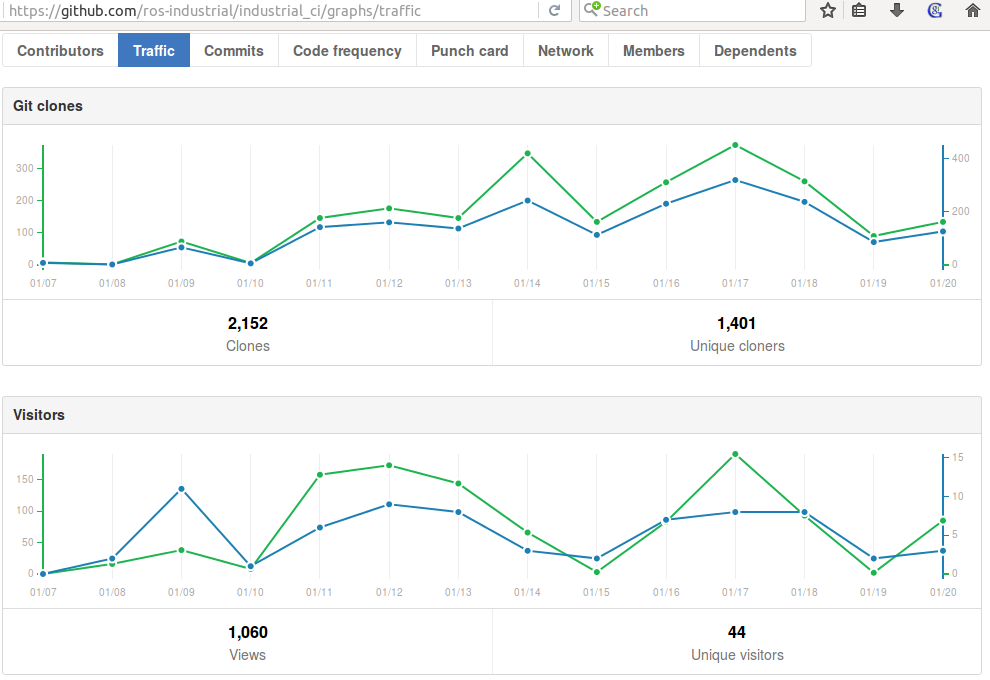
Github--> Graphs --> Traffic view (visible only to admins).
- Dec 30, 2018
- May 15, 2018
- Dec 12, 2017
- Jan 20, 2017
EoF